Highlights · Launcher ·

Unite Gaming Launcher 2.0: one platform for the gamers of Turkmenistan

Unite Gaming Launcher 2.0 — the new Unite Gaming launcher for Windows, built from scratch: one community for every player in Turkmenistan, our own servers, network play and support right in the launcher.

Updated 13 November 2026: the new launcher is out for all players — download Unite Gaming Launcher. Below we explain why we built it and what it will change.

Download the launcherUThe Unite Gaming team14 min read
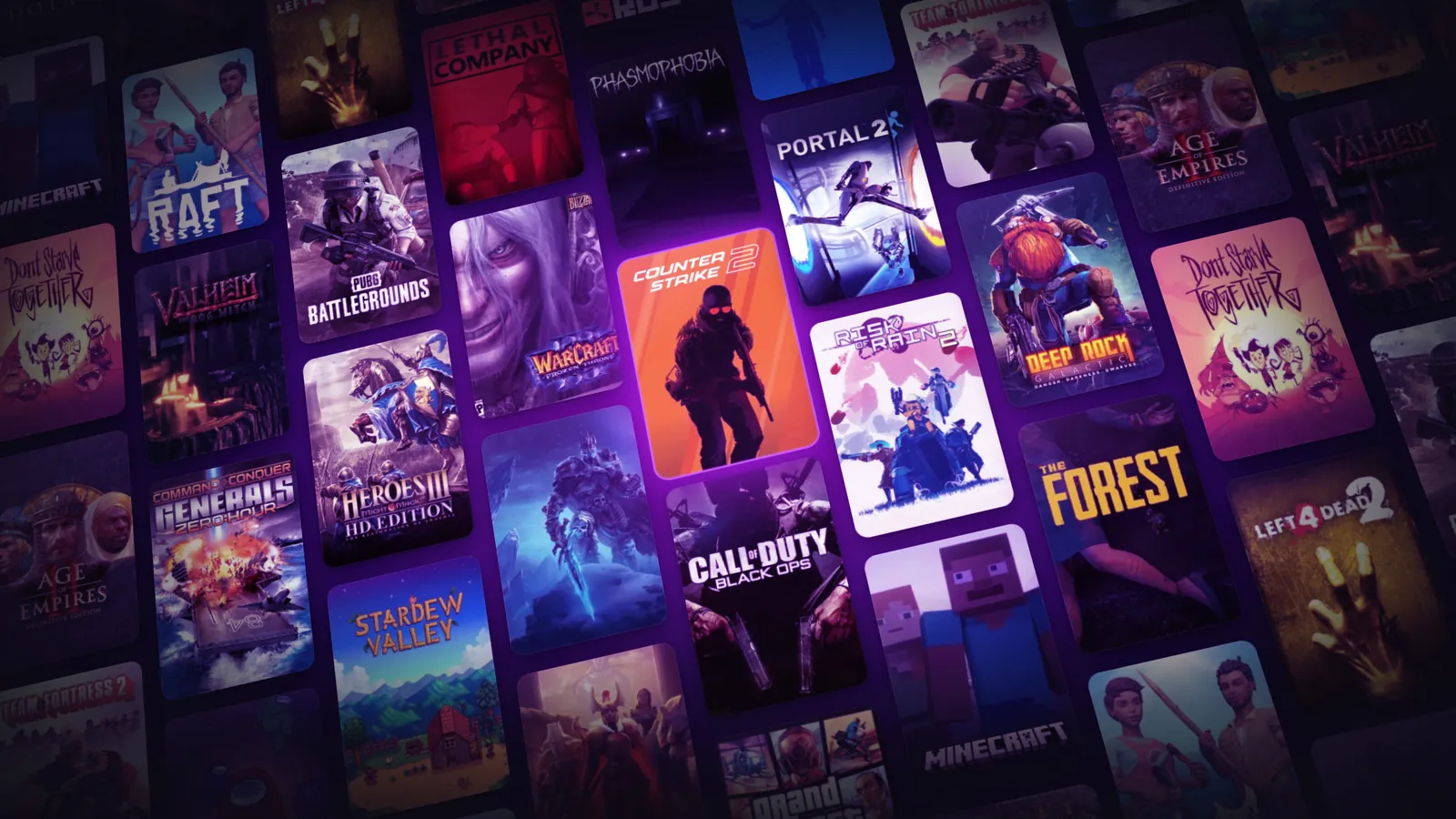
A wall of game covers from the Unite Gaming catalogue

In short

  • Unite Gaming Launcher 2.0 — a new free launcher for Windows 10 and 11, built from scratch.
  • Since 12 November 2026 all players have it.
  • Inside — the community: shared channels, voice rooms, friends and teammate search.
  • Rooms for network play, Unite's own servers and matches for your own group.
  • Support — tickets right in the launcher, and the answer arrives there too.
  • Planned: tournaments, «Game of the day», apps for Android and iOS.

Why there was no news for so long

Yes, we went quiet for a long time. Most of our effort went into other projects and the launch of Unite Shop, and there was no time left for news about Unite Gaming itself. But the network kept running all this time, you kept playing, and we watched the community grow and saw where it was getting cramped. That is where the new launcher came from.

How we see Unite Gaming

That group of five no longer lives in a closed chat. They have their own channel in the launcher and a voice room where they meet in the evenings. When they are one short of a full team, they don't call around; they create an event, «tonight at nine, need a fifth», and within a few minutes the spot is taken.

A newcomer who used to have no idea where to go comes in and sees right away what is going on: who is online, what people are playing today, where a team is being gathered. He writes in his game's channel, gets invited to voice, and does not spend his first evening on Unite Gaming alone.

And the two who never crossed paths in a whole year meet in the same match. They add each other as friends. Then they call the others into voice. A couple of months later they have their own team, their own records and their own jokes.

This is how we see Unite Gaming: not a network you connect to, but a place where people gather. Where there is always someone to play with, something to talk about and someone to come back to.

You come home, and your people are waiting for you.

NNomad · need a fifthtoday at 21:00 · already 4 of 5I'm in
Examplean event in a game channel: the spot is taken within minutes

The idea: one community for every player in the country

More than 1000 people come to us every day. Shooters, Minecraft, strategy games: everyone has their own game and their own group. And we noticed: dozens of small groups live in one network without knowing anything about each other. A group of five sits in its own chat, a newcomer comes in and has no idea where to go, and two players who would make a great team never cross paths in a whole year.

The old launcher could not help here: it connected you to the network, and that was the end of its job. We gave the new one a different task. The most valuable thing in Unite Gaming is not the servers or the games, but you. So the launcher has to work for you: shared channels and voice rooms, teammate search, friends, events. All in one window, for every player in Turkmenistan.

Community — is what the whole launcher is built around. Games, servers and support matter, but they all serve one goal: that you always have someone to play with.

A few words on how we work now

Before, any change at Unite Gaming — the website, the launcher, events, new games — needed long planning. We did not always have the expertise and the people, and weeks, sometimes months, passed between an idea and a release. That is why many of your requests stayed on the «someday» list.

We are building the new launcher differently. The team works together with AI tools and development agents: they take care of the routine, and we focus on what really matters — the community, your requests and quality. An idea that came up in the morning can be in the launcher the same evening or the next day.

For you this means a simple thing: Unite Gaming will change faster, and your feedback directly shapes what it becomes.

An idea in the morningIn the launcher by evening
Examplefrom idea to update
Update

What's new in Unite Gaming Launcher 2.0

Next, in order: what changed in the launcher, in games, in the community and in support. Some features already work, others arrive in the next updates — we will cover each one in the changelog.

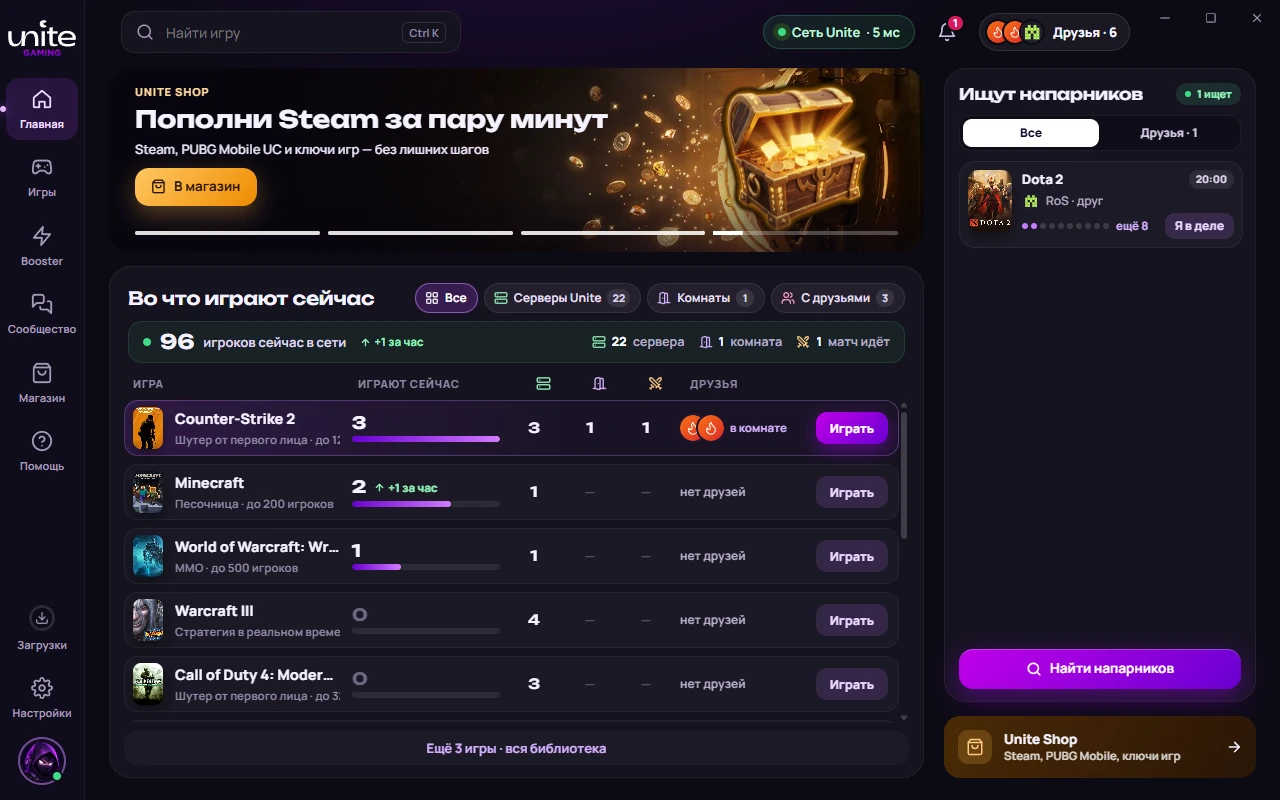
The home page of the Unite Gaming launcher
Home: what's being played now, teammates and Unite Shop
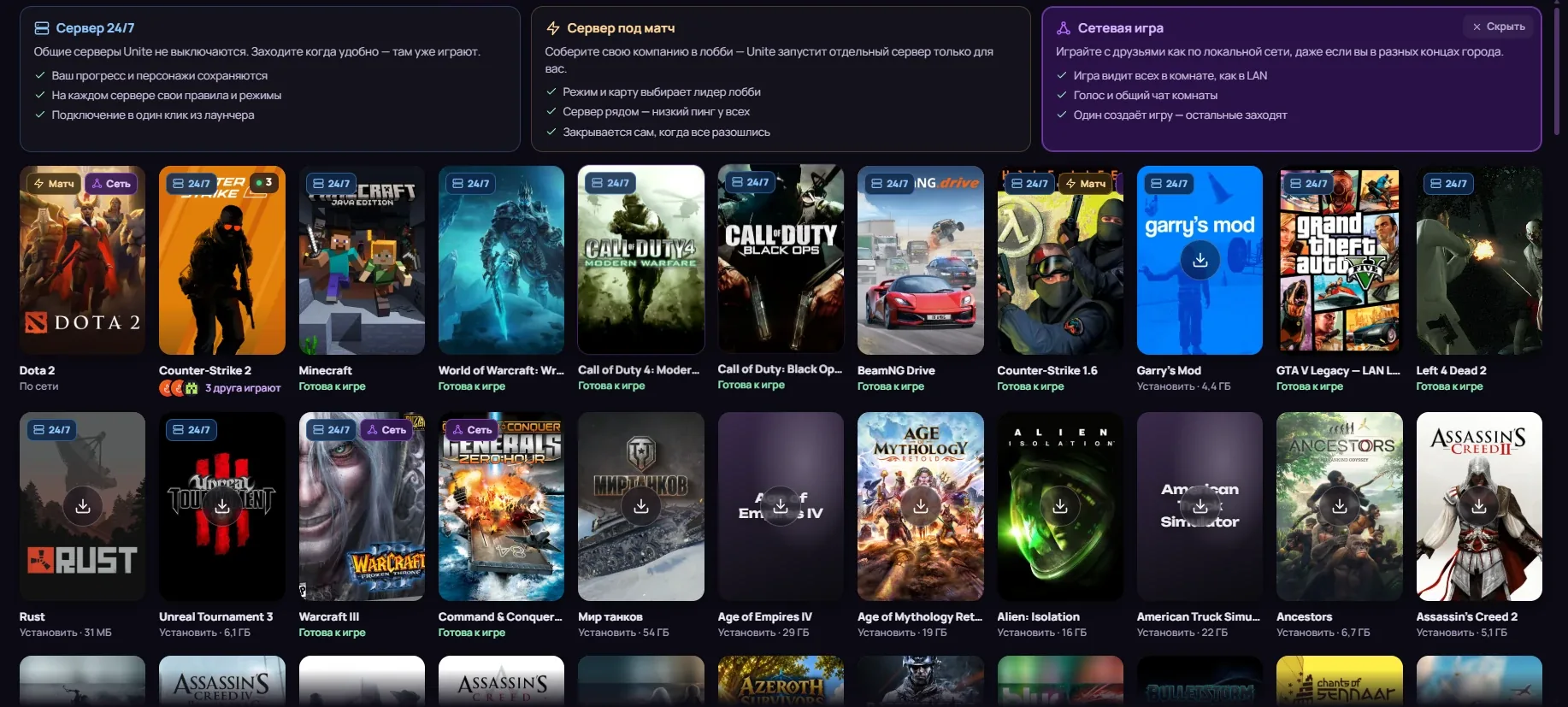
The game library in the Unite Gaming launcher
Library: 24/7 servers, matches and network games
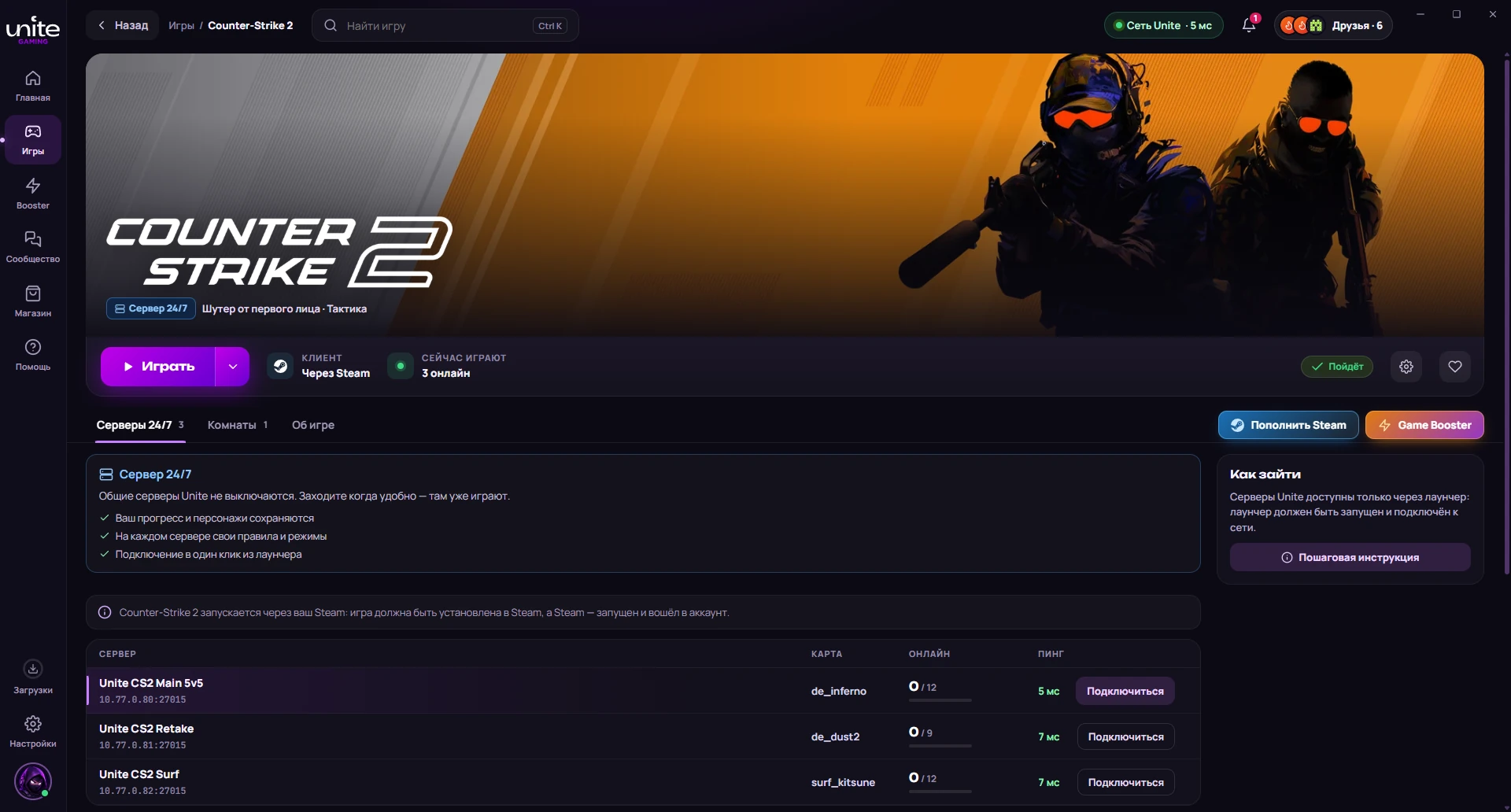
The Counter-Strike 2 game page in the Unite Gaming launcher
Game page: «Play», servers, rooms and community
Part 1

Launcher

The launcher — is the base of everything else: how you connect and play. Here is everything that changed in the connection itself.

A more stable connection

We rewrote the connection in the new launcher from scratch, and it holds up noticeably better. If your internet blinks, the launcher restores the link by itself without kicking you out of the game: your friends won't even notice anything happened. Players of older games will feel the difference most: Warcraft III, Generals and others now run smoothly all evening.

A static IP address for every player

In the new launcher every player gets their own static IP address. It is tied to your account and does not change from session to session: today, tomorrow and a month from now you are on the network under the same address.

For gaming this helps in several ways at once. Friends add your server once and never ask for the address again. If you host a room in an old game, it is always in the same place. And when something goes wrong, support only needs your nickname to see what is happening with your connection.

Connection modes: one launcher for different jobs

The old launcher had a separate «key» for every job. Now these are connection modes: you choose what you want to do, and the launcher sets up the network for it.

  • LANConnects you to a local room where friends see you as if you were on one network. For server games and LAN games, old and new.
  • SteamSpeeds up game downloads and opens access to the Steam store. Big updates download faster.

Network metrics: ping, speed and loss in real time

Right in the launcher you see what is happening with your connection: ping to the server, speed, latency and packet loss. Everything updates in real time, so if the game starts to lag, you understand in a second where the problem is: your internet, the server or one of your friends. The metrics are visible even before you launch the game.

Ping5 ms
Speed46 Mbit/s
Loss0%
Examplemetrics are visible even before the game starts

Full-speed downloads with pause and version control

The launcher has its own download manager built in. Game patches and updates download at the top speed your internet allows: a file is split into parts and fetched in parallel, not in a single stream as in a browser.

Any download can be paused and resumed later from the same spot. You started a download in the afternoon, turned the PC off, turned it back on in the evening, and the download carried on instead of starting over.

For every game you see which version you have installed and which one is current. If your friends have already updated and you have not, the launcher shows it before you launch, not at the moment you fail to connect to their server.

Warcraft III64% · version 1.26a → 1.27b
Examplea paused download with the game version

Two languages, one community

The new launcher works in Russian and Turkmen. You pick the interface language yourself in the settings and can switch it at any time: menus, notifications, tips and tickets will be in the language that suits you.

At the same time we have one community for everyone. Channels, voice rooms, teammate search and events are shared no matter which interface language you use. In chats everyone writes the way they are used to, and Russian and Turkmen sit side by side just fine.

PC, Android and iOS: one account for all devices

The new launcher is already out on PC, and the apps for Android and iOS — are planned.

You have one account for all devices. Sign in on your phone with the same login as on your PC, and you land in the same community: the same friends, the same channels, the same conversations. During the day you chat with friends from your phone, talk over the evening match or just hang out, and in the evening you sit down at your PC with everything already agreed.

On the phone the launcher does the same as on the PC: it creates a local network over the internet. Mobile games with a «local network» or «Wi-Fi» mode will see your friends as if you were in the same room, whatever district or city they are in. Such games include Minecraft, Terraria, Mini Militia, Special Forces Group 2, Among Us, BombSquad, Soul Knight and more.

Part 2

Games

Games — are the heart of Unite Gaming. This part is about servers, the catalogue and everything a game needs to simply start and run smoothly.

Server games: regular events and a big online crowd

This is about games such as WoW, Minecraft, Counter-Strike 2 and others. Before, a server simply ran: we set it up, it held the players, and that was it. Any event, new mode or season took so much effort that we rarely got around to them.

The new launcher changes this. First, we expect noticeably more players on the servers: connecting is easier, friends are visible, rooms gather in a minute. Second, the AI that helps us with development now helps with server games too: it helps prepare regular events, new modes and scenarios we used to lack the resources for.

For you this means a server will no longer sit unchanged for months. Something new will show up regularly: weekend events, seasonal modes, quests you complete together. Every week there will be a reason to drop in, not only when friends call you. We want server games to become again what Unite Gaming once started with.

Servers for network games: we host them, not your PC

Before, one of the players hosted a network game on their own computer. With a 6 Mbit home connection that was enough for three or four people, and after that everyone started to lag: the host was carrying both the game and everyone else.

Now we host more and more network games on our own servers. You create a session in the launcher, and our server takes the load instead of someone's home internet. Up to 16 people can play in one room with low ping and without the lag that used to start with the fifth player.

The catalogue updates itself: new games and fresh versions

Network and single-player games in the catalogue update automatically. A new version is out, and it is already in the launcher, with no manual searching and downloading. New games appear regularly, and you learn about each addition from the update notes and in the launcher.

Server space is not unlimited, so we will remove games nobody has played for a long time from the catalogue. Want to see a specific game in the catalogue — suggest it through a ticket.

A game installs together with everything it needs

When you install a game, the launcher checks by itself whether your PC has everything needed to run it: DirectX, Visual C++, .NET and other components. If something is missing, it is installed together with the game, automatically.

No more hunting for why a game won't start, downloading libraries from random websites or puzzling over errors like «d3dx9_43.dll is missing». Install, press «Play», and everything works.

Your own servers for Dota 2, CS 2 and CS 1.6

For some session-based games you can now start your own server right from the launcher and play on it with your group. It is like meeting at a game club: you and your friends on one server, no random people, with the rules you picked yourselves.

Press «Create server», pick a game, invite friends from your list, and in a minute you can play. The server runs on our side, so nobody in your group has to keep it running on their PC. At launch Dota 2, CS 2, CS 1.6 and others are available. We will keep growing the list.

Your own games: add any game and play it over the network

If the game you need is not in the catalogue, add it yourself. Point to the game's folder on your PC, and it shows up in the launcher next to the others: with one-click launch, an «in game» status for friends and access to rooms.

Most importantly, network play in it works just like in the catalogue games. Create a room, invite friends, and the game sees them on the local network as if you were sitting side by side. An old game from a disc, something downloaded from a forum ten years ago: if the game has a LAN mode, you can play it together on Unite Gaming.
Part 3

Community

Before, when you turned on your PC, you already had to know what you would play and with whom: agree in advance, find people in chats, wait for an answer. Now the order is different: you open the launcher and decide right there who to talk to today and what to play. People are already here: some online, some in a game, some gathering a group.

Friends: see who is playing what right now

Add a friend once, and they are always in sight: online or not, which game they are in right now, which room they are sitting in. Open the launcher and you see: three in Warcraft III, two in Generals, one free. No need to write «where are you?», just click and join.

KKerimin game · Warcraft III
AAynain game · Generals
MMaralonline · free
Examplefriends: who is playing what right now

Chats: general, per game and right inside the game

You can talk on three levels. The general chat, where the whole community lives. A chat for each game, where only those who play it gather: to agree on a match, ask for advice, find a fifth. And a chat inside network and server games, where you write right during the session without switching windows.

Rooms: your group, your network

A room brings a group of players into a separate local network: everyone in it sees each other and can play together. Every room has text and voice chat, and the game can be launched through a server session on our server. No outside voice apps and no typing in addresses by hand.

Teammate search: open games you can join

Want to play but have no group? Create a network game in the launcher and leave it open. It shows up in the shared list, and any player can see it and join. It works the other way too: open the list, see who is playing what right now and where people are needed, and join.

The list is filtered by game, so you only see what you want to play. For every open game you see how many spots are left and who is already in. That way a game does not sit empty waiting for friends, and strangers become acquaintances after one match.

Tournaments: every week (planned)

Planned — a knockout team tournament once a week. You will put a team together, sign up right in the launcher and play at the set time. The bracket, schedule and results will be shown there too, with nothing to look for elsewhere.

The games will rotate: one week a Dota 2 tournament, the next CS 2 or another session game. The most popular ones, like Dota 2, will come back regularly, so regular teams will always have something to prepare for.

Game of the day: everyone in one game at the same time (planned)

We plan to pick one game from the catalogue every 3–4 days and announce it as the game of the day. The idea is simple: when everyone joins one game at the same time, there is always someone to play with, even if it is usually quiet.

We will publish the schedule in advance, so you have time to download the game and invite friends. You open the launcher, see that Thursday's game of the day is Generals, start the download, and on Thursday you are already in battle with new people.

Notifications: tournaments, friends, updates

The launcher on your PC and phone notifies you about what matters to you: a tournament in your game, a friend joined a game, support's reply to your ticket, an update for a game you installed. You choose what to get and what not, so the launcher won't make noise for nothing.

Part 4

Support and order

To play in comfort you need more than games: quick help, fair procedures and clear rules. All of that now lives inside the launcher.

Support and bugs: tickets inside the launcher

Before, reporting a problem was not easy: write in a chat or by email, hope someone sees it, and wait with no answer. We know many bugs went unheard, and the people who reported them never knew whether their message got through.

Now all of support lives in the launcher. Found a bug, missing a game, have an account question? Press «Report a problem», describe what happened and send it. Every request — is a ticket with a status at every step: received, in progress, resolved. If we need details, we write right in the ticket, and when the problem is solved, you are the first to know. No message gets lost, and we answer everyone.

  1. Received
  2. In progress
  3. Resolved
Exampleticket status at every step

PC diagnostics through the launcher

If something doesn't work, the launcher collects a technical report on your system and connection when you ask it to and attaches it to the ticket. We don't need to ask dozens of questions, and you don't need to explain step by step what is going on. The answer comes faster and is more precise.

Logs and crash center

If a game or the launcher closes with an error, the launcher saves a report and sends it to us automatically. The report contains only technical data, and automatic sending can be turned off in the settings. This lets us find and fix recurring problems before most players report them.

Update notes: you always know what changed

Every launcher update comes with a list of changes: what was fixed, what was added, what was improved. You see it in the launcher right after the update, on the website in the version history and in our channel, where we post about every release.

No more silent changes. If you reported a bug and it got fixed, you will find it on the list. If something starts working differently, you will know why. We want you to see how Unite Gaming gets better and to see your own part in it.

Reports and appeals: a clear procedure

If you were banned on one of our servers, you have the right to appeal. Right in the launcher you describe your side and send it for review. The appeal is reviewed by a different administrator, not the one who issued the ban, so the decision does not depend on one person. The appeal status is shown in the launcher, and the answer arrives there too.

Screen recording: evidence against cheaters

Spotted a cheater in a server or session-based game? Start a recording right from the launcher, and two minutes of what is on your screen are saved to a file. You can attach it to your report right away. No separate screen-recording apps needed, and the admins get what they need to decide: not words, but a recording.

Rules and moderation

The launcher has rules, and we will make sure they are followed. Insults, cheats and cheating other players will not go unnoticed. Penalties apply across the whole platform at once: a violator loses access not to one server but to all of Unite Gaming. This is so that everyone can play here in comfort, not just the loudest.

What's next

The new launcher came out for all players on 12 November 2026. We describe what changes in each version in thechangelog.

Thank you for being with us! The Unite Gaming team

Download the launcher

Unite Gaming Launcher 2.0 for Windows 10 and 11 — free.

Download Unite Gaming Launcher 2.0